

Releases
Your overview of new features and functionality for the platform.
We’re always working to make Genius Finder better for you.
This page is your go-to source for the latest feature updates, enhancements, and improvements.
Whether it’s new strategies and recommendations related to your strengths and challenges, performance upgrades, or smarter ways to get things done, you’ll find everything you need to know right here.
For each new feature, we’ll explain:
- Why it matters – How it helps improve your experience.
- How it works – A quick overview of what’s new.
- How to get started – Tips on making the most of it.
Check back regularly to stay up to date and let us know your feedback—we’re building Genius Finder with you in mind!
A Fresh New Genius Finder® Experience & Introducing Genius Finder® V5
Release date: 10 July 2026
We've given Genius Finder® a refresh!
From today, you'll notice a fresh new look and feel, improved navigation, and a more guided experience designed to help you move seamlessly from completing your profile to understanding your results and taking practical next steps.
The refreshed experience includes:
- Improved graphs and visualisations to make your results easier to understand.
- Enhanced accessibility, including improved compatibility with text-to-speech tools.
- A smoother, more intuitive experience throughout the platform—from profiling and reviewing strategies to creating action plans and reports for yourself and others.
These improvements are now available to everyone, regardless of which version of Genius Finder® you're using.
Introducing Genius Finder® V5
Genius Finder® V5 is our biggest profiler update yet, providing an even richer understanding of how people think, work, communicate and thrive.
V5 introduces:
-
A richer profile across 19 skill areas, including six brand new skill areas:
- Social Navigation
- Energy Regulation
- Navigating Change
- Working Independently
- Digital Literacy
- Critical Thinking
- Updated and simplified strategies to make it even easier to turn your insights into meaningful action.
Will I see V5 straight away?
If you're using My Genius Finder®, V5 is available for you to explore now.
If you're completing Genius Finder Pro® through your employer or another organisation, your organisation decides when to enable V5. If it isn't available to you yet, don't worry—you'll be invited to use it as soon as your organisation is ready.
In the meantime, you can enjoy the refreshed Genius Finder® experience, which is now available to all users.
We hope you enjoy exploring the new experience!
Report Builder
Release date: 03 March 2025
Introducing our new Report Builder feature!
You’ve spoken, we’ve listened!
We understand that everyone thinks differently and has unique preferences for the level of detail and content they want to see in their reports.
That’s why we’re thrilled to introduce our new Report Builder tool, designed to help you customise your report content to suit your needs.
A Fresh New Genius Finder® Experience & Introducing Genius Finder® V5
Release date: 10 July 2026
We've given Genius Finder® a refresh!
From today, you'll notice a fresh new look and feel, improved navigation, and a more guided experience designed to help you move seamlessly from completing your profile to understanding your results and taking practical next steps.
The refreshed experience includes:
- Improved graphs and visualisations to make your results easier to understand.
- Enhanced accessibility, including improved compatibility with text-to-speech tools.
- A smoother, more intuitive experience throughout the platform—from profiling and reviewing strategies to creating action plans and reports for yourself and others.
These improvements are now available to everyone, regardless of which version of Genius Finder® you're using.
Introducing Genius Finder® V5
Genius Finder® V5 is our biggest profiler update yet, providing an even richer understanding of how people think, work, communicate and thrive.
V5 introduces:
-
A richer profile across 19 skill areas, including six brand new skill areas:
- Social Navigation
- Energy Regulation
- Navigating Change
- Working Independently
- Digital Literacy
- Critical Thinking
- Updated and simplified strategies to make it even easier to turn your insights into meaningful action.
Will I see V5 straight away?
If you're using My Genius Finder®, V5 is available for you to explore now.
If you're completing Genius Finder Pro® through your employer or another organisation, your organisation decides when to enable V5. If it isn't available to you yet, don't worry—you'll be invited to use it as soon as your organisation is ready.
In the meantime, you can enjoy the refreshed Genius Finder® experience, which is now available to all users.
We hope you enjoy exploring the new experience!
With the new Report Builder, you can now filter strategies and report content based on:- Relevance to Your Work Context: Tailor the report to focus on the skill areas most relevant to your job.
- Your Profiler Results: Use insights from your profiler to guide your focus, whether you want to leverage your strengths or address areas for development.
- Usefulness of Strategies: If you’ve already used our new Strategy Rating tool, you can now use these ratings to ensure your report targets those that will work best.
- Level of Detail: Choose how detailed you want the strategies to be, from high-level overviews to in-depth analyses.
- Preferred Strategy Types: Select the types of strategies you believe will work best for you.
- Content Type: Decide on the type of content you want to see in your report, so it best meets your need.
Whilst it provides you with more personalisation and flexibility, it’s also very simple to use through a guided three-step process (See summary below)
Once you’ve customised your report, you can add your chosen strategies to your action plan and start turning insights into action!
We now offer four different ways to access your results, ensuring there’s something for everyone. Dive in and discover the best way to make the most of your insights today!
| Effort Level | Report Name | Description |
|---|---|---|
| Ready Made | Short report | Summary of findings, without strategies. |
| Ready Made | Long report | Summary of findings, with all relevant strategies. |
| Customisable | Strategy sorter | Answer two quick questions and we’ll pick the top 12 most relevant strategies for you. |
| Customisable | Report Builder | Create the perfect fit for you by filtering the types of skills, strategies and report content you want to include. |
We hope you enjoy our new Report Builder! Please do share any feedback with us through our survey.
Or email us at support@geniusfinder.com.
Report Builder – Steps Overview
- Step 1 – Skills: Choose and order the skills that are most relevant to you
- Step 2 – Strategies: Choose the strategies to add to your report
- Step 3 – Design: Choose the report options and layout
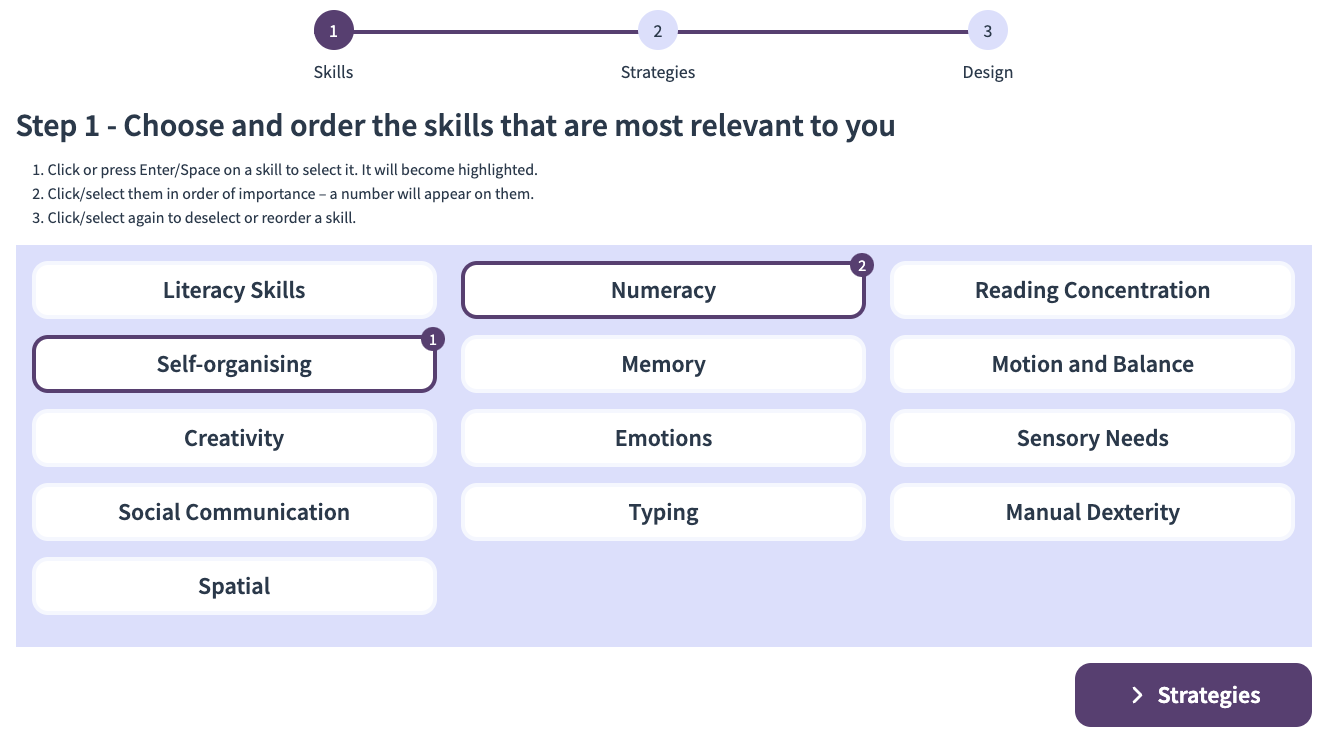
Step 1 - Skills
Choose and order the skills that are most relevant to you.
- Click or press Enter/Space on a skill to select it. It will become highlighted.
- Click/select them in order of importance - a number will appear on them.
- Click/select again to deselect or reorder a skill.
Step 2 - Strategies
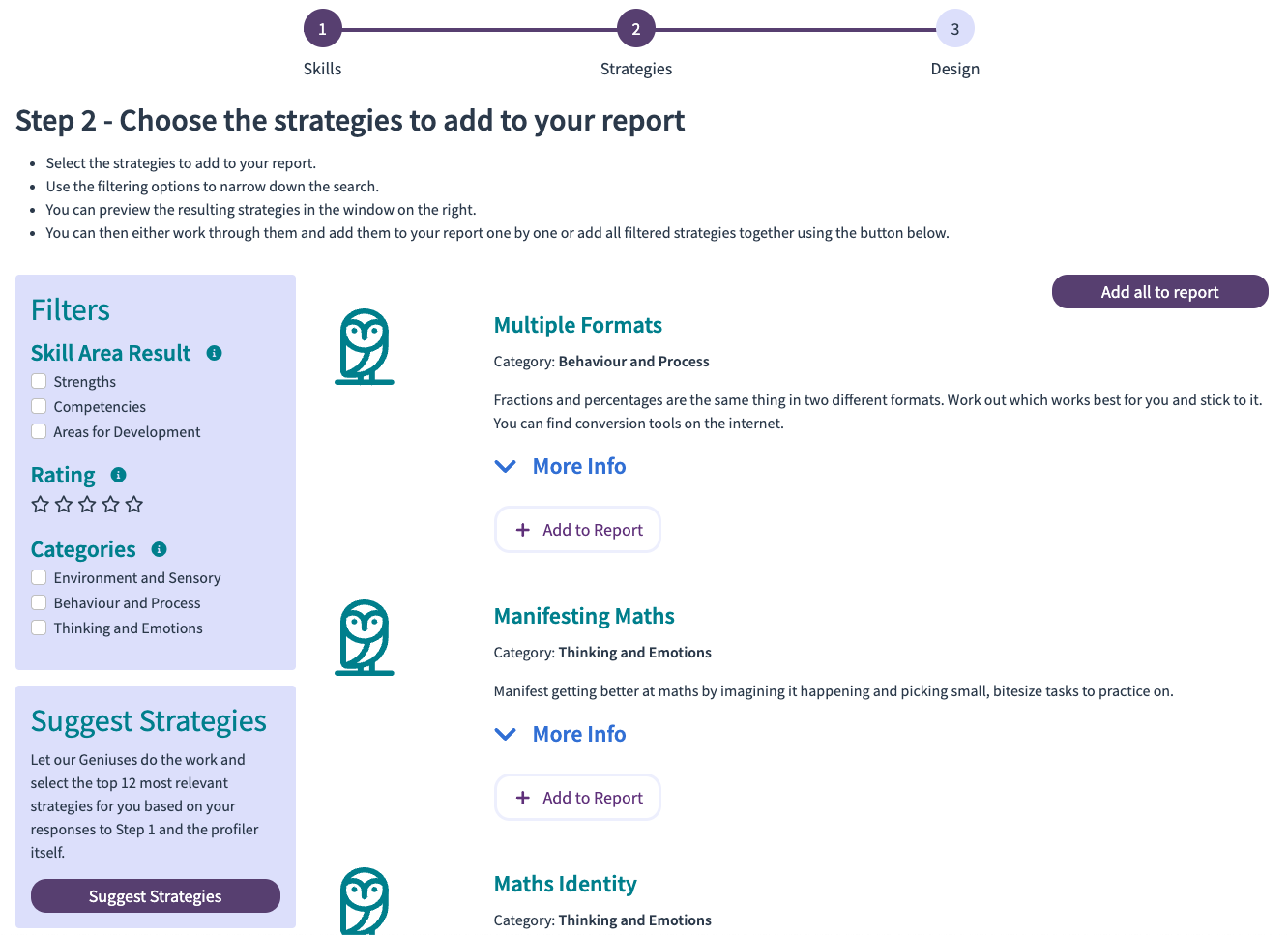
Choose the strategies to add to your report.
- Select the strategies to add to your report.
- Use the filtering options to narrow down the search.
- You can preview the resulting strategies in the window on the right.
- You can either work through them and add them to your report one by one or add all filtered strategies together using the button.
Step 3 - Design
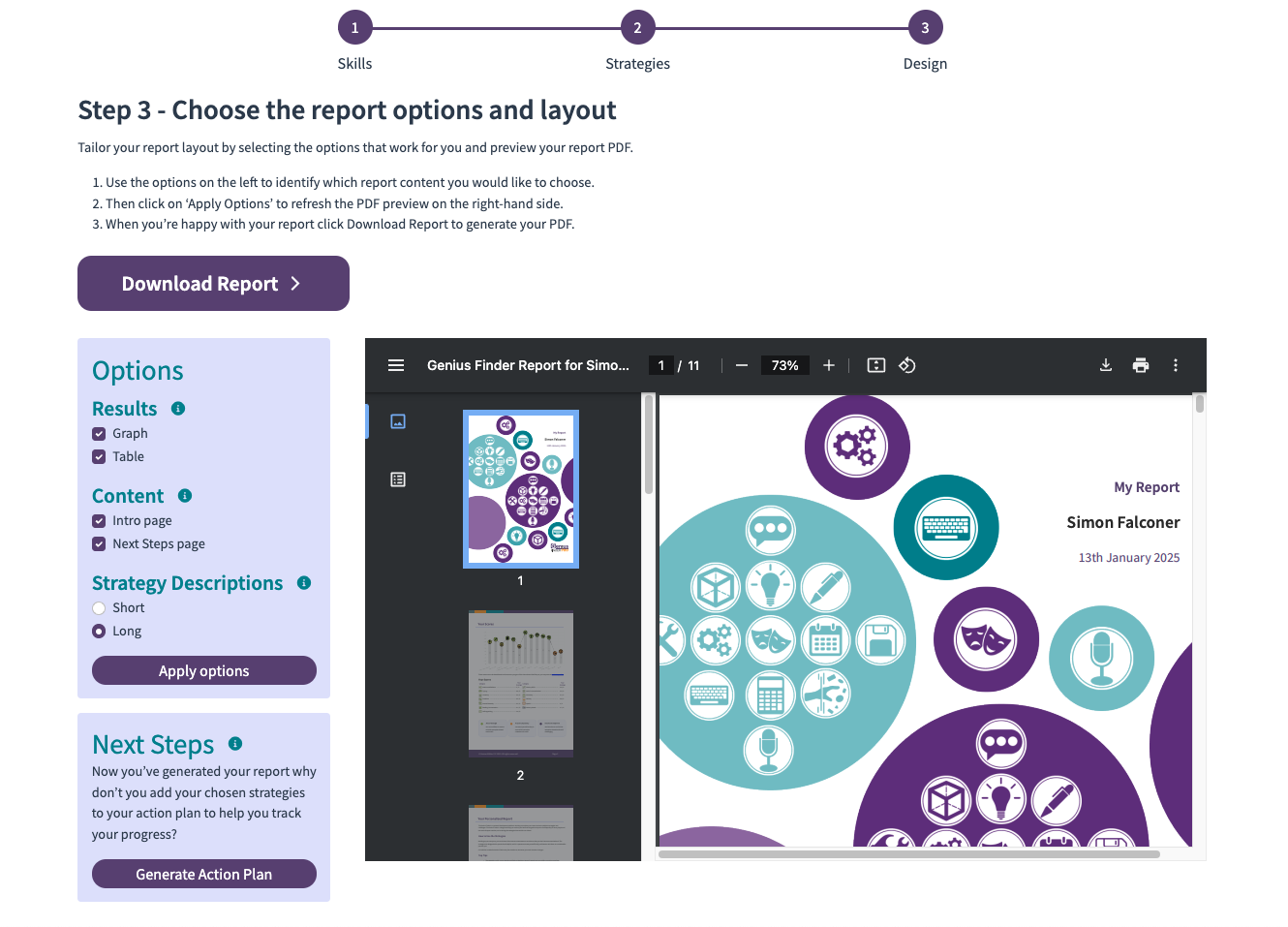
Choose the report options and layout
- Use the options on the left to identify which report content you would like to choose.
- Then click on "Apply Options" to refresh the PDF preview on the right-hand side.
- When you're happy with your report click DownloadReport to generate your PDF.
Rate My Strategies
Release date: 17 Feb 2025
We’re pleased to introduce our latest feature – Rate My Strategies!
Now, as you work through your strategies, you can rate them based on their usefulness to you. Whether it’s a game-changer or just so-so, give it a rating from 1 star (not very useful) to 5 stars (super useful).
These ratings will help you pinpoint the most impactful strategies, making it easier to create a powerful action plan. And guess what? We’re already cooking up more ways for you to use these ratings in the near future. Stay tuned for more updates!
Ready to start rating? Dive in and let us know what you think!